Cash and change
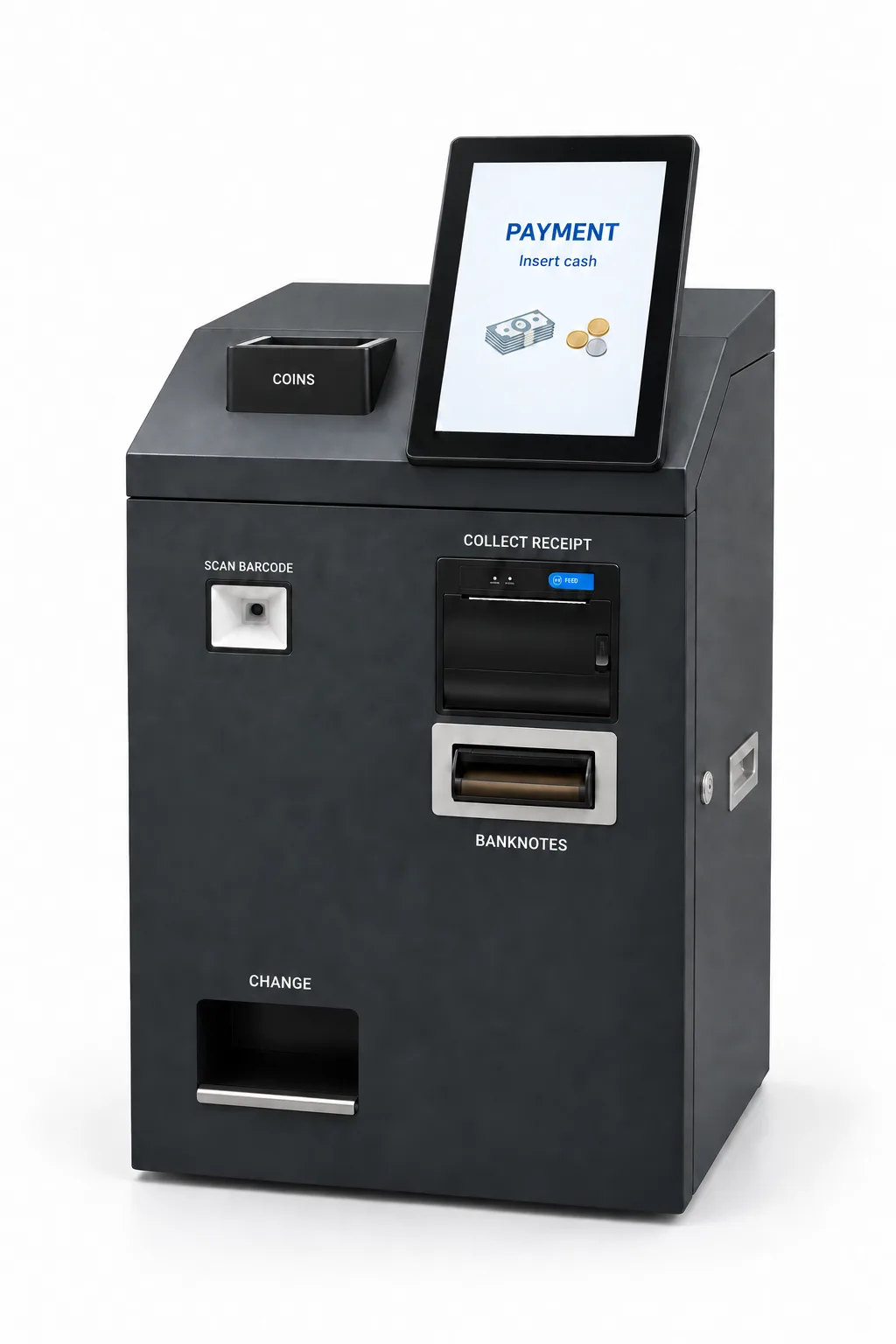
The machine accepts cash and returns change while your staff continue serving customers.

CASHBOX CB09 Automatic Cashier
Payment and receipt, without a stop at the cashier.
Customers order at a kiosk or on their phone, scan at Cashbox, pay with coins or banknotes and collect their receipt there. No visit to the staffed checkout or assistance from a cashier is needed.
€10,540including 24% VAT
Machine price excluding VAT: €8,500
Cashbox inspection and setup: €372 including VAT per machine (€300 excluding VAT).
WHY CASHBOX
The machine accepts cash and returns change while your staff continue serving customers.
The retail receipt is printed at the machine after payment. Customers collect it there, without visiting a cashier.
A front 10.1″ touchscreen provides guidance and idle-time promotions. A separate rear 10″ touchscreen serves the administrator.
Displays and specifications →Connects with supported ordering software and your existing receipt provider, subject to compatibility checks.
Explore integrations →INDEPENDENT CASH CHECKOUT
Customers order at a kiosk or on their phone, scan at Cashbox, pay with coins or banknotes and collect their receipt there. No visit to the staffed checkout or assistance from a cashier is needed.
The barcode / QR scanner identifies the order from the kiosk or phone, and Cashbox displays the amount due.
The customer inserts coins or banknotes. Cashbox completes payment and automatically returns any change due.
After payment, the retail receipt is printed at Cashbox. The customer collects it from the same machine without needing a cashier.
Once the transaction completes successfully, the paid order is sent to the supported ordering system for preparation.
Just as customers pay by card and collect their receipt at an ordering kiosk, Cashbox lets them complete the transaction independently — with cash.
BUILT-IN EQUIPMENT
RECEIPT AFTER PAYMENT
A built-in printer using 80 mm paper. After completing payment at the automatic cashier, the customer collects their receipt from the same machine.
Receipt issuance uses the integration with the store’s software and receipt provider.
ORDER IDENTIFICATION
The built-in scanner reads the order code supplied by the kiosk or displayed on a phone. Cashbox identifies the order and displays the amount due so the customer can proceed with payment.
PAYMENT AND CHANGE
Accepts and validates banknotes. The recycling system keeps banknotes available to return as change.
PAYMENT AND CHANGE
Accepts, validates and stores mixed coins, automatically dispensing the coins needed for change.
Actual coin capacity depends on the denomination mix.
THREE JOURNEYS. ONE AUTOMATIC CASHIER.
A staff member enters the order. The ordering software sends the payment request to boxcontrol, and the customer pays and collects the receipt at Cashbox.
Explore this journey →The customer orders at the kiosk and can pay by card at its POS terminal. If they choose cash, they scan the barcode at Cashbox, pay with coins or banknotes and collect their receipt there. No visit to the staffed checkout or assistance from a cashier is needed.
Explore this journey →The customer orders on their phone through TableManager. If they choose cash, they scan the barcode at Cashbox, pay with coins or banknotes and collect their receipt. The entire checkout is completed without a stop at the cashier or staff assistance.
Explore this journey →Card at the kiosk POS. Cash, change and receipt at Cashbox.
CLOUD CASH MANAGEMENT SOFTWARE
Orders reach Cashbox through boxcontrol. Access your cash management wherever you are, with fewer human errors from handling cash.
IN YOUR VENUE
Multiple ordering points can share Cashbox units. Their number and position depend on customer demand, cash payments and the venue layout.
Explore placement options →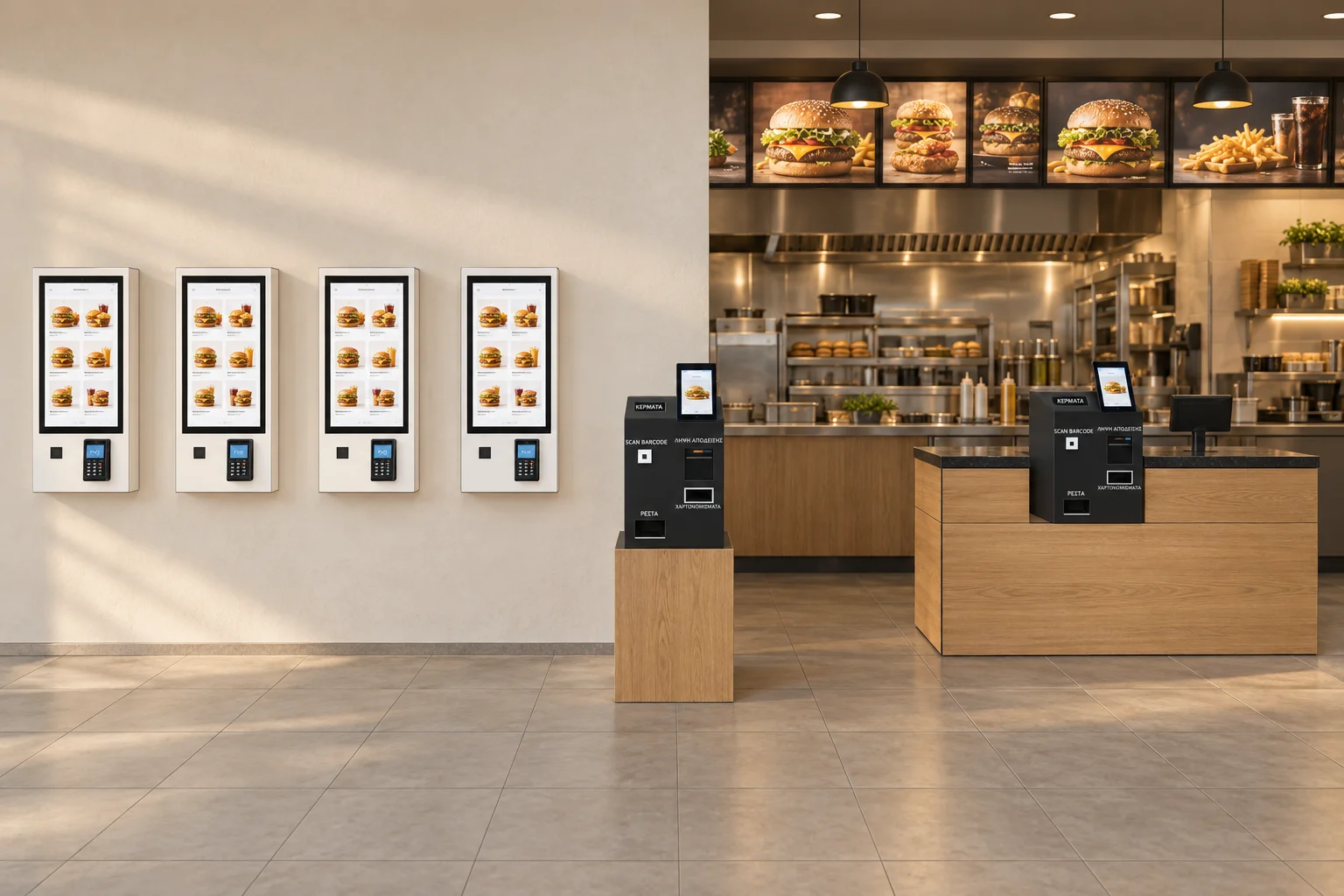
Illustrative venue layout. Each kiosk includes a card-payment terminal.
BEFORE CHOOSING CASHBOX
Multiple kiosks can share Automatic Cashiers. The right ratio depends on peak-time demand, the share of cash payments and the venue layout.
Venue placement →Cashbox connects with supported ordering software through boxcontrol. We check compatibility with your store’s software as part of integration.
Ordering software integration →Cashbox connects with your store’s existing digital invoicing provider. Receipts issued through Cashbox count towards the document allowance in your current contract, without a new provider contract. We check compatibility with your software and provider during integration.
Your existing provider →Annual hardware maintenance is required, either by our team or by a person you designate with our guidance.
Support and annual maintenance →The main price is for the machine including 24% VAT. The net price is also shown. Installation by our technician is charged separately, with an individual quote for each case. Any software charges are confirmed before purchase.
Cashbox inspection and setup: €372 including VAT per machine (€300 excluding VAT).
Machine and configuration: €10,912 including VAT, plus delivery and any additional services.
Cashbox requires boxcontrol to operate. You can purchase the machine separately without software, but it cannot operate until it is connected to active boxcontrol software. The machine inspection and setup charge does not include a boxcontrol licence or subscription. The one-time boxcontrol licence costs EUR 372 including 24% VAT (EUR 300 excluding VAT) per store, regardless of the number of kiosks and Cashbox machines. Annual boxcontrol cloud software operation: EUR 148.80 including 24% VAT (EUR 120 excluding VAT) per Cashbox per year, starting in the first year, regardless of the number of connected kiosks. The annual fee covers operation of the boxcontrol cloud application and its connection to the automatic cashier: remote access to the balance, device status and transaction history, according to the connected machine’s capabilities. Telephone technical support is included during office hours, 09:00-17:00, for issues that can be checked and resolved remotely. Hardware maintenance: Physical Cashbox maintenance and on-site technical support are separate services and are not included in the annual boxcontrol software fee. The boxcontrol licence and annual service are agreed and invoiced separately from the Cashbox purchase and are not included in the online payment for the machine. See boxcontrol software pricing ↗
Delivery within Greece: €74.40 including VAT per machine (€60 excluding VAT).
CB09 product details →CASHBOX FOR YOUR BUSINESS
Tell us how you serve your customers. We will discuss Cashbox placement and connecting it with your software.